
Meta Just Let You Build Your Own AI Gadget. Here’s What’s Actually Possible
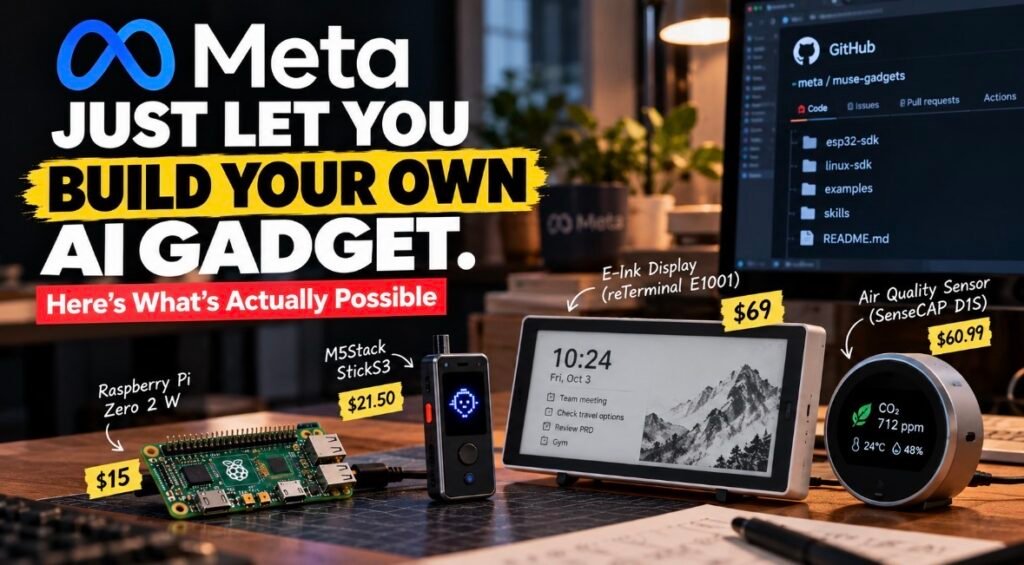
A $15 Raspberry Pi Zero 2 W can now talk to Meta’s AI agent. So can a $21.50 stick from M5Stack that fits in your pocket, or an e-paper screen sitting on your desk.
Meta shipped this on Friday, October 2. It’s called Meta Muse Gadgets, and I spent today reading the GitHub repo instead of the headlines.
Honestly? The repo is the better story.
What Meta Muse Gadgets actually is
Muse is Meta’s personal AI agent (if agents are new to you, here’s what an AI agent actually is), the one that books travel, fills out forms and shops for you. Muse Gadgets lets you build hardware for it.
There are two parts, both open source under Apache 2.0. The ESP32 Device SDK is firmware for cheap Wi-Fi boards. Depending on the board, you get a status light, a screen for images Muse sends, push-to-talk or sensor readings. The Linux Device SDK goes on a Raspberry Pi (3B+, 4, 5 or Zero 2 W) or any Linux machine with Bluetooth LE, and lets Muse run commands, move files and check the machine’s health.
Every gadget needs an SDK token from gadgets.muse.ai, and you pair it in the Muse app with Developer mode on.
Meta’s own pitch is half the fun: “built by hackers, for hackers, just for fun,” with side effects that “may include bricked boards, voided warranties, brownouts, or bankruptcies.”
Meta built one gadget itself, too. The Muse Home Link is a USB-C device that lets Muse reach the stuff on your home Wi-Fi. Nat Friedman, head of product at Meta Superintelligence Labs, said on X they made 5,000. They’re free with an active Muse subscription, but US only, one per subscriber, shipping in October.
So that counts me out. Fine. Building your own is more fun anyway.
Here’s what I’d build
Quick heads-up: these are my ideas, not features Meta announced. Each one leans on something the repo supports today.
A desk screen your AI fills up
The Seeed reTerminal E1001, a 7.5-inch black-and-white e-paper display, is on the supported list. Muse can send it images, which get dithered on the device, and e-paper keeps the picture even with the power off.
Picture a quiet board above your keyboard where Muse drops your next meeting or a nudge. One early builder, David Singleton, posted almost exactly this on launch day.
An air-quality nag
The SenseCAP Indicator D1S and D1Pro have CO2 and tVOC sensors built in, plus a temperature and humidity sensor in the box. Muse reads all of them with a single command.
So instead of guessing whether your room feels stuffy, you just ask. Small thing. Surprisingly useful.
A Pi that does your boring sysadmin jobs
This is the one I’d start with.
Meta’s README suggests asking “What’s using all the disk space on my Pi?” or “Every morning at 7, check if my Pi’s backups ran and tell me if they didn’t.”
The clever part is musegadget send-user-msg. Any script on the machine can message your Muse without its own login, like Meta’s example: “The garage door has been open for an hour.” Their sample code even forwards voice notes from a Pebble ring into a Muse chat. That’s the kind of weird I’m here for.
A pocket push-to-talk remote
The M5Stack StickS3 gets the full treatment: an animated avatar, push-to-talk, a two-button menu and images. Hold the button, talk, read the reply on its tiny screen.
Add the home-network tunnel and the repo’s 43 community “skills” (Philips Hue, Sonos, LG and Samsung TVs, Roborock vacuums, Brother printers and more), and it starts feeling like a remote for your house. They’re community-written, though, not official integrations.
A 3D-printer babysitter
There’s a community skill for printers running Moonraker (Klipper folks, you know). It reports job progress and temperatures and can pause, resume or cancel a print when you ask. It deliberately won’t send arbitrary G-code or change your config.
I like that restraint more than I expected to.
What you’ll need
Less than you’d think. The quickest start is the ESP32-C5 DevKitC-1, which works as-is with its built-in status light and BOOT button. Add a USB cable that carries data (not a charge-only one, the classic trap), a Mac or Linux computer, ESP-IDF version 6.0.1 specifically, and the Muse app.
Don’t want to fight a toolchain? Meta suggests letting its Muse Code agent build and flash it for you, approving each command as it goes.
Prices on the makers’ own stores as I write this: $15 for a Pi Zero 2 W, $21.50 for the StickS3, $41.99 for Waveshare’s round 1.75-inch AMOLED board, $60.99 for Seeed’s SenseCAP Watcher and $69 for the reTerminal E1001. Shipping and taxes are extra, and prices move.
Who this is really for
People with a drawer full of dev boards. Home Assistant tinkerers. Anyone who wants an assistant that lives outside a phone app.
Never flashed firmware? Maybe not this weekend. The StickS3’s first flash alone involves pasting register writes into a REPL.
The catch
There are a few, and they matter.
You can’t sell what you build. The code is Apache 2.0, but the SDK token is for personal, non-commercial use. You can put one token in up to 50 devices you hand to others, but you can’t sell, advertise or list them.
It’s not a product. Meta’s terms call it “not a supported product and not a developer platform,” and it can change or vanish without notice.
Security is your job. On Linux, Muse gets the same access as the account you install it for. If that account can use sudo, so can Muse. The docs also admit pairing can’t prevent an active man-in-the-middle attack, so set it up on a network you trust. Meta also strongly recommends turning on NVS encryption, because without it anyone holding the board can read your Wi-Fi credentials.
Replies are text. Muse answers in writing, shown as captions. Want it to talk back? You’ll wire up your own text-to-speech.
Availability is patchy. Muse is still in limited testing and isn’t in every country. The free tier has usage limits, paid plans run $20 or $100 a month, and Home Link is US only.
My honest take
I love this. Not because anyone needs a Muse-powered stopwatch, but because it’s rare to see a big AI company say “here’s the firmware, go nuts” instead of selling you a shiny pin.
It’s also early. Builds come out as version 999.0.0, one board is still experimental, and Meta itself calls it a side project.
My advice? Start with the Pi. It’s cheap, it’s the least fiddly, and an agent running real commands on a real machine is where it stops feeling like a chatbot. Just give it an account without sudo. That’s the real promise of Meta Muse Gadgets: an AI that does stuff, on hardware you own.
FAQ
Is Muse Gadgets free?
The code is. You still need a Muse account and an SDK token, and Muse’s free tier has usage limits.
Do I need a Muse Home Link?
No. That’s Meta’s own ready-made gadget. You can flash a supported ESP32 board or set up a Pi yourself.
Which boards work?
The repo lists 15 ESP32 boards from Espressif, M5Stack, Waveshare, Seeed and others. The Linux SDK runs on recent Raspberry Pis and other Linux machines with Bluetooth LE.
Can I sell a gadget I build?
No. The token terms ban selling, advertising or publicly listing devices that use your token.
Sources: Meta, Muse Gadgets · Muse Gadget SDK Token Terms · GitHub: facebookincubator/muse-gadget-sdk · TechCrunch · Digital Trends · Meta Help Center: Muse subscriptions
