
AI Won’t Replace Everyone. But These Skills Could Make You Harder to Replace
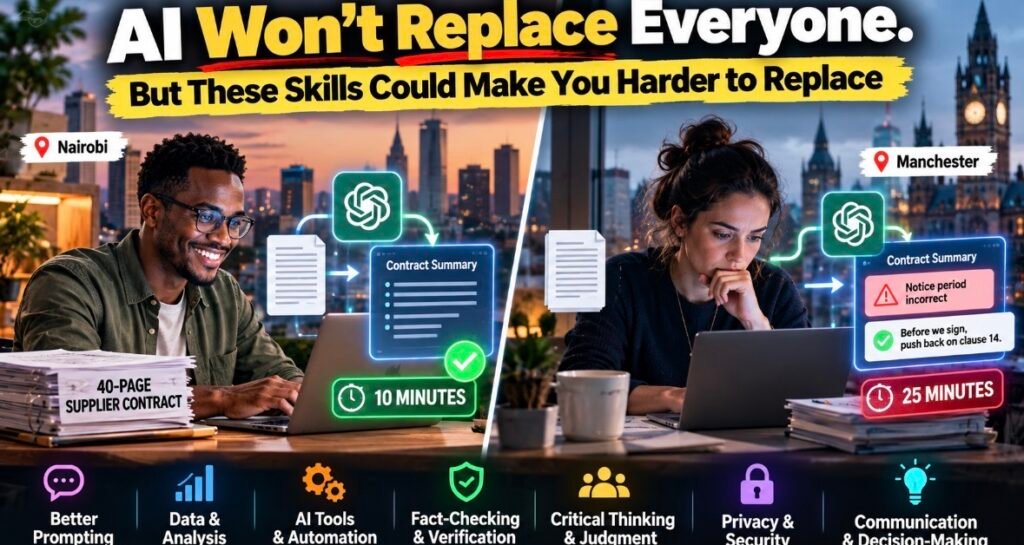
Picture two people at two desks, one in Nairobi and one in Manchester. Same task: summarize a 40-page supplier contract by lunch. Same free chatbot.
The first sends the summary in ten minutes.
The second takes twenty-five. She reads the clauses the AI flagged, notices it got the notice period wrong, fixes it, and adds one line at the top: “Before we sign, push back on clause 14.”
Both of them “use AI.” Only one of them is hard to replace.
That gap is what this post is about. Not the AI skills that look good on a slide, but the ones that make your boss, client or customer think, I need this person specifically.
What the data says about AI skills right now
I went through the big recent reports. A pattern jumps out.
- WEF Future of Jobs Report 2025: AI and big data is the fastest-growing skill through 2030. Creative thinking, resilience, and curiosity and lifelong learning are rising too. Analytical thinking is still the top core skill, and employers expect 39% of workers’ core skills to change by 2030.
- PwC’s 2026 Global AI Jobs Barometer: Roles asking for AI skills advertise a 62% wage premium on average, up from 57%. (PwC says that figure doesn’t control for education, experience or location.) New tasks added to AI-exposed jobs are 2.5 times more likely to rely on empathy, judgment and creativity.
- Microsoft’s 2026 Work Trend Index: Among 20,000 AI users in 10 countries, including India, Brazil, Japan and the UK, the human skills rated most important were quality control of AI output (50%) and critical thinking (46%).
- Stanford AI Index 2026: AI skills appear in 4.7% of job postings in Singapore, 3.3% in Spain, 2.4% in Chile and 1.9% in the UK, per Lightcast data. AI literacy is growing faster than engineering-heavy AI skills in most countries.
- LinkedIn Skills on the Rise 2026: Across 12 markets, people skills like cross-functional collaboration and stakeholder communication are rising right alongside AI business strategy.
My read? The tech skill and the human skill aren’t two lists anymore. They’re one skill seen from two sides.
My framework: Operator, Checker, Owner
AI makes first drafts almost free. So the value moves to three roles:
- Operator. You can get useful work out of AI tools in your actual field.
- Checker. You can tell when that work is wrong, risky or leaking something it shouldn’t.
- Owner. You make the call, sign your name and keep the customer’s trust.
Most people stop at Operator. That’s the crowded bit. The further down this list you go, the harder you are to swap out.
(Not sure how exposed your own job is? I wrote about the jobs AI may change, with a quick self-check. This post is the “so what do I learn?” follow-up.)
The Operator skills
1. Using AI inside your own field
A nurse, a lawyer and a sales rep need very different things from the same tool. The value is knowing which parts of your work AI handles well.
- Good looks like: You have three or four go-to uses you trust, and you know the ones you don’t.
- Practise this week: Pick one task you do every week. Do it with a free chatbot three times. Note how long it took and what you had to fix.
- Prove it: Show a before-and-after sample with one honest line, like “Weekly report: three hours down to one, and I still check every figure.”
2. Working with data and spreadsheets
AI writes formulas in seconds now. That makes spreadsheet skills more important, not less, because otherwise you can’t tell when its chart is nonsense.
- Good looks like: You can clean a messy sheet, build a pivot table and explain what the numbers mean in one sentence.
- Practise this week: Download a free dataset from the World Bank’s open data site or your own country’s statistics office. Ask AI for three insights, then rebuild one of them by hand in Google Sheets or Excel.
- Prove it: A one-page chart with a single recommendation beats “advanced Excel” on a CV every time.
3. Directing AI agents and simple automations
This one’s moving fast. Lightcast data in the Stanford AI Index shows “agentic AI” skills went from 0.06% of US job postings in 2024 to 0.23% in 2025, roughly 90,000 postings.
An AI agent doesn’t just answer. It acts. Somebody has to tell it what to do, what it must never do, and when to stop and ask.
- Good looks like: You can write a clear “job description” for an agent and spot where it needs a human checkpoint.
- Practise this week: Set up one small automation using the free tier of Zapier or Make, or plain old email rules in Gmail or Outlook. Write down the goal, the trigger and one failure you’d want to catch.
- Prove it: A documented workflow, including the time it broke and what you changed.
The Checker skills
4. Checking and verifying AI output
If I could pick only one skill, it’d be this. Microsoft’s survey ranked it first.
My rule is the sign-off test: would I put my name on this if “the AI said so” wasn’t allowed as an excuse? When I research posts for this site, I treat every AI answer like a tip from a stranger. Interesting. Unverified.
- Good looks like: You check facts, numbers, names and quotes against the original source, every time.
- Practise this week: Ask AI a question in your field that produces five factual claims. Check each one. Mark it right, half right or wrong.
- Prove it: Keep an “AI catch log.” One story in an interview about an error you caught is worth more than any certificate.
5. AI privacy and security hygiene
Every AI tool wants more access: your inbox, files, calendar. Knowing when to say no is a skill employers quietly value, because one leaked client file costs more than any tool saves. I wrote about how AI agents pushed Apple to tighten Mac Full Disk Access, and the lesson goes well beyond Macs.
- Good looks like: You know your employer’s AI policy, you strip out names and numbers before pasting, and you check what apps you’ve connected.
- Practise this week: Open the settings of the chatbot you use most. Check whether your chats are used for training and what apps are connected. Write a short “never paste” list: client names, ID numbers, passwords, health data.
- Prove it: Explain how you anonymize data in interviews, or write a one-page AI do’s and don’ts for your team.
The Owner skills
6. Asking sharp questions and writing clear briefs
Vague in, vague out. That’s true for AI and every colleague you’ve ever had.
- Good looks like: Before asking for anything, you can say the goal, the audience, the limits and what “done” looks like in four sentences.
- Practise this week: Write that four-line brief before your next AI request. Then use the same brief with a human and notice the drop in back-and-forth.
- Prove it: Short, clear writing samples are evidence in themselves.
7. Judgment and decision-making
AI can give you five options in ten seconds. It can’t own the consequences of picking one. PwC’s 2026 data shows “professionalised” roles, where AI handles routine work and humans make the calls, growing twice as fast as roles AI simply makes easier, with 42% faster wage growth.
- Good looks like: You make a call with incomplete information, explain why, and change course without drama when you’re wrong.
- Practise this week: Start a decision journal in your notes app. Write the decision, the options and what you expect to happen. Check back in a month.
- Prove it: Prepare two stories where you overruled the easy answer, AI’s or anyone else’s, and it paid off.
8. Communication, trust and client relationships
People buy from people. A chatbot can draft the apology. It can’t sit with an angry client and win them back.
- Good looks like: Clients ask for you by name. Colleagues bring you the messy problems.
- Practise this week: Swap one email a day for a five-minute call. Ask one client or colleague, “What’s the most annoying part of working with us?”
- Prove it: Testimonials, repeat clients, referrals and LinkedIn recommendations that mention specifics.
9. Learning fast and going deep in your field
You can only spot a wrong answer in a field you actually know. Add the habit of learning quickly and you’ve got what the WEF calls curiosity and lifelong learning.
- Good looks like: You can pick up a new tool or topic in a week and explain it to someone else.
- Practise this week: Use AI as a tutor, not an answer machine. Try: “Quiz me on this topic and don’t give me the answer until I’ve tried.” Or start the free Elements of AI course from the University of Helsinki and MinnaLearn.
- Prove it: A learning log or short public posts explaining what you’ve learned. Teaching is the best receipt.
Skills I’d skip or deprioritize
Honest opinion time.
- Prompt engineering as a career. As a skill inside your job, sure. As a job title, I wouldn’t bet on it. Lightcast found job-posting mentions of ChatGPT, chatbot and conversational AI skills fell from 2024 to 2025 while agent skills shot up.
- Certificate collecting. Five badges and zero real work won’t impress anyone.
- Chasing every new tool. Get good at one or two. The habits transfer.
- Coding purely out of fear. If you enjoy it, brilliant. But you don’t need it to be valuable.
- Building models from scratch. Unless you want to be an ML engineer, it’s the wrong rabbit hole.
If you’re just starting out
This is the hardest spot, and I won’t pretend otherwise. PwC’s analysis of 2.4 million US entry-level jobs found AI-exposed roles are now seven times more likely to ask for senior-type skills like leadership and judgment. Those roles have grown 35% since 2019, while other entry-level roles shrank 10%.
The bar for “junior” just moved. Stanford’s AI Index also warns that heavy AI reliance may slow how people build skills. So here’s what I’d do:
- Learn the work by hand first. Do it the slow way a few times, then speed up with AI.
- Keep a no-AI hour. Microsoft found its most advanced AI users are more likely to do some work without AI to keep their skills sharp (43% vs 30%).
- Build proof, not a stack of PDFs. Two or three small real projects, with notes on what went wrong.
- Volunteer to own small things. Meeting notes, a client follow-up, a tiny process. Ownership is the senior skill you can practise on day one.
New to all this? Start with my plain-English guide to how generative AI works.
If you’re mid-career
You’ve got an underrated advantage: you know what good work looks like. That’s the Checker and Owner skill newcomers lack.
The trap? Microsoft found 45% of AI users say it feels safer to stick to current goals than to redesign their work with AI. Only 13% say they’re rewarded for trying new ways of working even when results don’t land.
So don’t wait for permission.
- Redesign one workflow. Not ten. One.
- Write your team’s AI rules. What’s allowed, what needs checking, what never gets pasted. Microsoft’s most advanced users are almost twice as likely to discuss quality standards for AI work with their team (54% vs 29%).
- Mentor someone junior. Teaching them where AI fails sharpens your own judgment.
- Write down your wins. Hours saved, errors caught, clients kept. Bring the list to your next review.
My honest take
AI won’t replace everyone. It’s already replacing the parts of jobs that are easy to check and easy to copy.
So be the person who checks. Learn the tools, sure. Then spend most of your energy on the things a tool can’t sign for: the call, the catch, the client.
The goal isn’t to beat AI. It’s to be the human it’s useless without.
FAQ
What are the most important AI skills to learn in 2026?
Using AI well in your own field, checking its output, working with data and directing AI agents, paired with judgment, clear writing and communication.
Do I need to learn coding to work with AI?
No. Most roles need AI literacy, not programming. Learn to code if you enjoy it or want a technical career.
Do AI skills really pay more?
Job ads say yes. PwC’s 2026 Barometer puts the average premium at 62%, though it doesn’t control for education or experience.
Where can I learn AI skills for free?
Elements of AI from the University of Helsinki and MinnaLearn is free. Google offers a free 45-minute Introduction to Generative AI course on Google Skills. Microsoft’s AI Skills Navigator has free learning paths by role. DeepLearning.AI’s short courses are free to enroll in right now, though certificates need its paid Pro plan.
How do I show AI skills on my CV?
Show results, not tool names. Try a line like “Used AI to cut monthly reporting from two days to half a day, with every figure checked by hand.” Back it up with a work sample.
Sources: WEF Future of Jobs Report 2025, skills outlook, WEF Future of Jobs Report 2025, digest, PwC 2026 Global AI Jobs Barometer press release, PwC 2026 Global AI Jobs Barometer full report, Microsoft 2026 Work Trend Index, Stanford AI Index 2026, economy, Stanford AI Index 2026, education, Lightcast on the Stanford AI Index 2026, LinkedIn Skills on the Rise 2026, Elements of AI, Google Skills: Introduction to Generative AI, Microsoft AI Skills Navigator and DeepLearning.AI courses.
